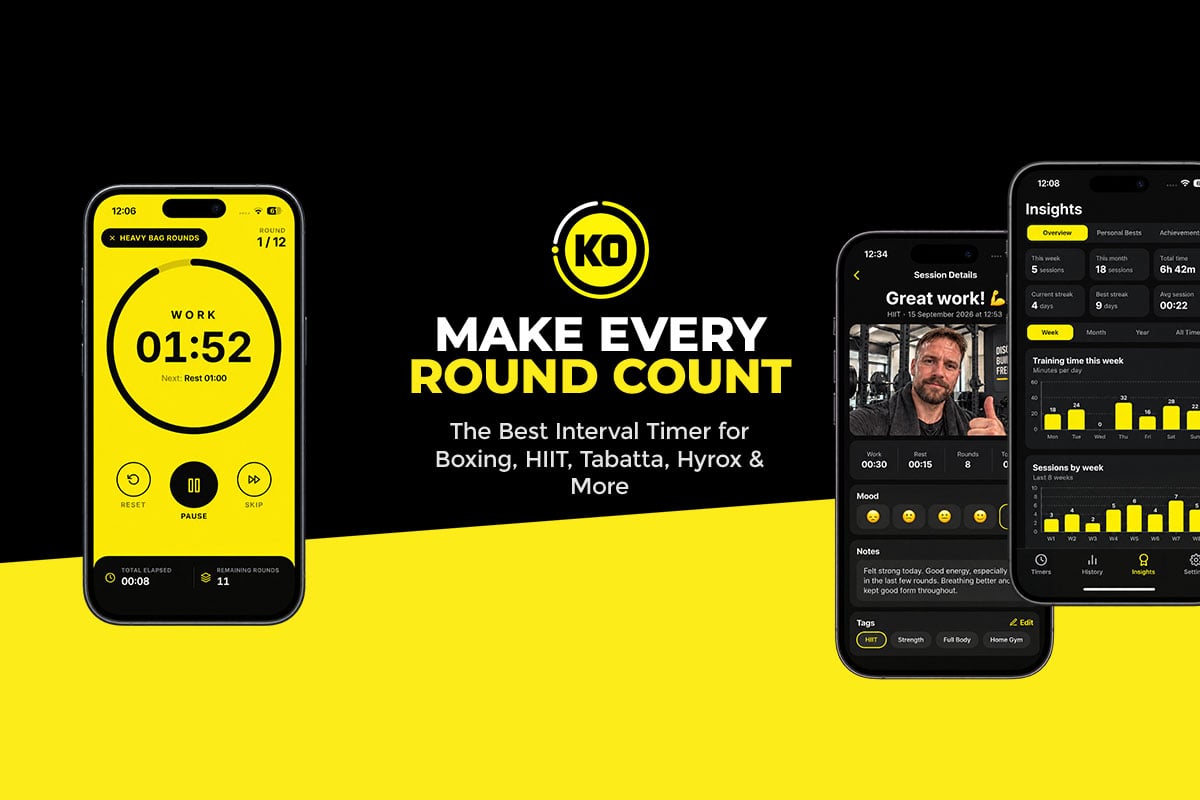
Ask most people what an interval timer does and they’ll say it counts down, beeps, and repeats. That’s where most apps stop. KO Interval Timer is where the interesting part begins.
Designed for iPhone, it handles boxing, HIIT, circuits, strength work and stretching with ease. Then it adds a voice coach to push you, badges to reward you and a journal to remember every session you’ve put in. Do these extras make a real difference? Here’s why we think they do.
First Impressions: Clean, Clear and Quick
Open KO Interval Timer and the focus is obvious: getting you training fast. The modern layout puts a big, readable countdown front and center, so a quick glance tells you how long is left in the round.
Audio is just as thoughtful. Choose your timer sounds and tailor alerts for the session start, each phase change and the end of the workout. Spoken countdowns mean you never have to look at your phone mid-combination, and optional vibration and visual cues help whether you’re in a loud gym or a quiet garage.
Personal touches include a custom accent color, your choice of sounds and coaching voice, and a keep-screen-awake setting so the timer stays visible without unlocking. Home screen widgets offer one-tap access to saved timers and training summaries, while Siri Shortcuts start a workout by voice. That’s a small detail you’ll love once your wraps and gloves are on.
The Standout Feature: A Journal for Every Workout
Here’s where KO Interval Timer really pulls ahead. Most timers wipe the slate clean when the countdown ends. This one hands you a workout journal and invites you to record the session while it’s fresh.

Each entry can include notes, tags, a difficulty rating and how you felt before and after training. There’s room for your bodyweight, too, if you want to track changes over time. Those details add up. Weeks later, you might spot that a session which once left you wrecked now feels comfortable, or that certain routines always leave you buzzing with energy.
Selfies That Show Your Progress
The journal also lets you take a post-workout selfie and attach it to the entry. It’s a simple idea with a big payoff. Scroll back through your history and you’ll see real faces, not just dates and numbers. Over months, that becomes a visual record of your journey, which is great motivation for anyone working toward weight loss, muscle gain or stronger fitness, and a fun keepsake from your toughest days in the gym.
Combine the photos with your notes and stats and the journal becomes a genuine fitness diary.
Your Data Stays on Your Phone
With selfies and bodyweight in the mix, privacy is a fair concern, and KO Interval Timer answers it well. Journal entries, notes and photos are stored locally on your iPhone, not uploaded to the developer’s servers. You don’t even need to create an account.
That’s a welcome approach if you’d rather keep personal progress photos off an online fitness profile. Just note that there’s currently no cloud backup or syncing between devices, so if you change phones or delete the app, don’t assume your journal will be restored.
Rewards and Records That Build Habits
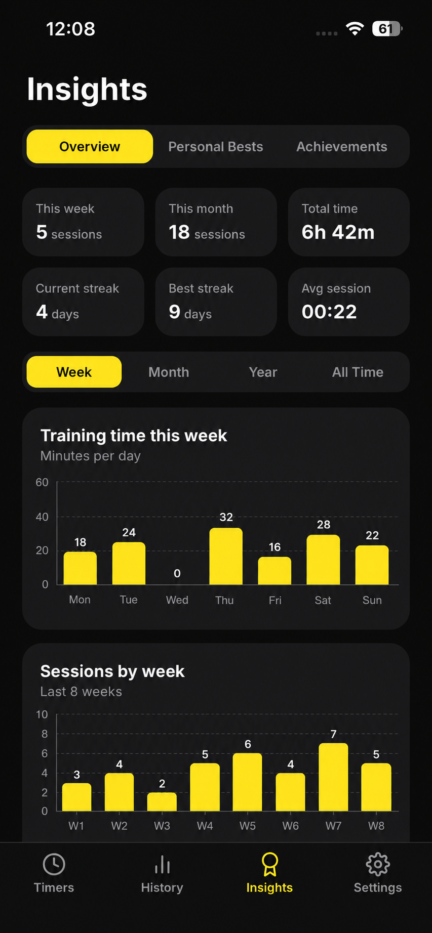
Consistency is the hardest part of any training plan, and KO Interval Timer gives you plenty of nudges. Achievement badges celebrate your milestones and add a game-like twist that makes collecting the next one strangely addictive. If you enjoy challenges, you’ll find yourself fitting in one more session just to unlock it.
Your full workout history sits alongside the badges. Total training time, rounds completed and workout activity are all recorded, and training streaks reward you for showing up day after day. Together, they make it easy to see how often you train, whether your round count is rising and how your routine has changed.
You can dip back into past journal entries anytime to reread notes and revisit your photos, keeping your whole fitness story in one tidy place.
A Coach in Your Corner
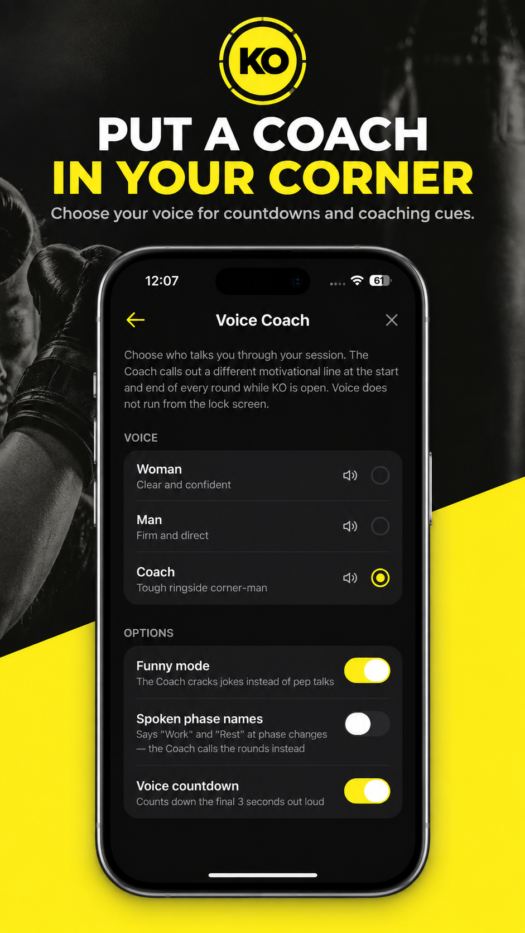
Every fighter knows the value of a voice in the corner between rounds. KO Interval Timer recreates that with optional voice coaching, swapping lonely beeps for real encouragement when fatigue sets in. There are three coaches to choose from. The Male Coach delivers focused motivation to keep you pushing, the Female Coach offers an alternative voice of guidance and encouragement, and the Boxing Coach brings fight-gym energy that suits heavy bag rounds, shadowboxing and combat sports perfectly.
Funny Mode: Motivation With a Grin
The Boxing Coach comes with an optional extra called Funny Mode. Turn it on and your coach serves up humorous motivational comments between rounds. After a gruelling round, a well-timed joke followed by “get ready” is surprisingly effective at getting you back on your feet. Most timer apps take themselves very seriously, so this playful touch gives KO Interval Timer real character and keeps familiar workouts feeling fresh.
Not in the mood? Voice coaching is entirely optional, and simple sounds and countdowns are always available.
Build Any Workout You Can Imagine
All the motivation in the world wouldn’t matter without a reliable timer, and the custom workout builder is excellent. You choose your work periods, rest times, number of rounds and preparation countdown, then give each phase its own name.
That flexibility means one app covers a wide range of training:
- Boxing and kickboxing: five three-minute rounds with one-minute breaks for bag work, pads, shadowboxing or sparring.
- HIIT: 30 seconds of all-out effort followed by 15 seconds of recovery.
- Tabata and circuits: fast intervals or timed stations with work and rest built in.
- Strength and conditioning: timed sets, rest periods and conditioning finishers.
- Stretching and mobility: longer holds for flexibility and recovery sessions.
Save any creation to your personal library and it’s ready whenever you are. Duplicate a timer to tweak it, adding rounds, shortening rest or building a tougher progression in seconds. Personal trainers will find this especially handy for running repeatable sessions with clients.
Price and Availability
KO Interval Timer is an iPhone app, available free on the App Store, and it requires iOS 16.4 or later. To use the timer and its premium features, you’ll need an active subscription, with monthly and annual plans and pricing shown clearly before you commit. You can find full details on the KO App Studio website.
One thing to know before you start: the app is designed to run in the foreground and doesn’t currently offer background or lock-screen alerts. Prop your phone where you can see it, turn on keep-screen-awake, and it’s a non-issue for most workouts.
Our Verdict: Should You Download It?
Yes, especially if you train in rounds. KO Interval Timer nails the essentials, from customizable rounds and rest periods to clear countdowns, flexible sounds and a library of saved workouts.
What earns it our top pick is the experience built around the timer. The male, female and boxing coaches bring energy to every session, and Funny Mode adds a dose of personality few rivals can match. Badges, stats and streaks reward consistency, while the private journal and post-workout selfies capture the effort behind each workout and turn it into a story of progress.
The subscription and foreground-only timer are worth noting, but they’re small considerations next to everything you get. For boxers, HIIT lovers and anyone who wants their training to feel more personal, this one is easy to recommend. Download KO Interval Timer from the App Store and start your next round today, or learn more about the app here.
Get 3 Free Stock Ebooks
Discover top-performing stocks in AI, Crypto, and Technology with expert analysis.
- Top 10 AI Stocks - Leading AI companies
- Top 10 Crypto Stocks - Blockchain leaders
- Top 10 Tech Stocks - Tech giants